-2.png?width=567&height=119&name=iScribe_Logo%20(2)-2.png)
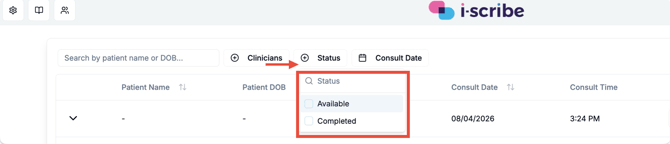
From the secretary view, you have a Status option (shown by the red arrow in the image below). From that Status option you can select Available or Completed (shown by the red box in the image below).
Each option works as follows:
Each option works as follows:
-
Available = Consult is available for action:
-
This shows you consults that have at least one output that is Approved, but has not been copied.
-
-
Completed = Consult has no required action, because:
- 1: For that consult, all of the Approved outputs have been Copied from the secretary view, or,
- 2: For that consult, there aren't any Approved outputs to be copied
Please let us know if you have other questions