How i-consult fits your day
How i-consult works day to day: patient histories appear automatically in your i-scribe transcript box before the consult, with no dashboard to open. Why a history can show before you've seen the patient.
The short version: you don't have to do anything. For most clinicians, i-consult runs in the background. An appointment in your EMR creates a patient episode, your patient completes their questionnaire ahead of time, and the structured history is sitting in your i-scribe transcript box when you open it for the consult. There is no separate app to log into and no file to import.
The dashboard is optional. The i-consult dashboard exists if you ever want to look closer at an episode, but the day-to-day value lands inside i-scribe, where you already work. Most clinicians never open it.
How it works, start to finish
An episode is created automatically. When a matching appointment appears in your EMR (Gentu, Genie, or Xestro via the Akuru browser extension), i-consult creates a patient episode for it. You don't create it by hand.
Your patient gets a link. i-consult schedules an SMS to the patient a set number of days before the appointment (3 days by default) with a secure link to their pre-visit questionnaire.
Your patient completes the questionnaire. They verify their date of birth, then answer an adaptive, specialty-aware set of questions by typing or speaking, at their own pace, before the appointment.
A structured history is generated. i-consult synthesises their answers into a clinically organised history (presenting complaint, history of presenting complaint, past medical history, medications, and more).
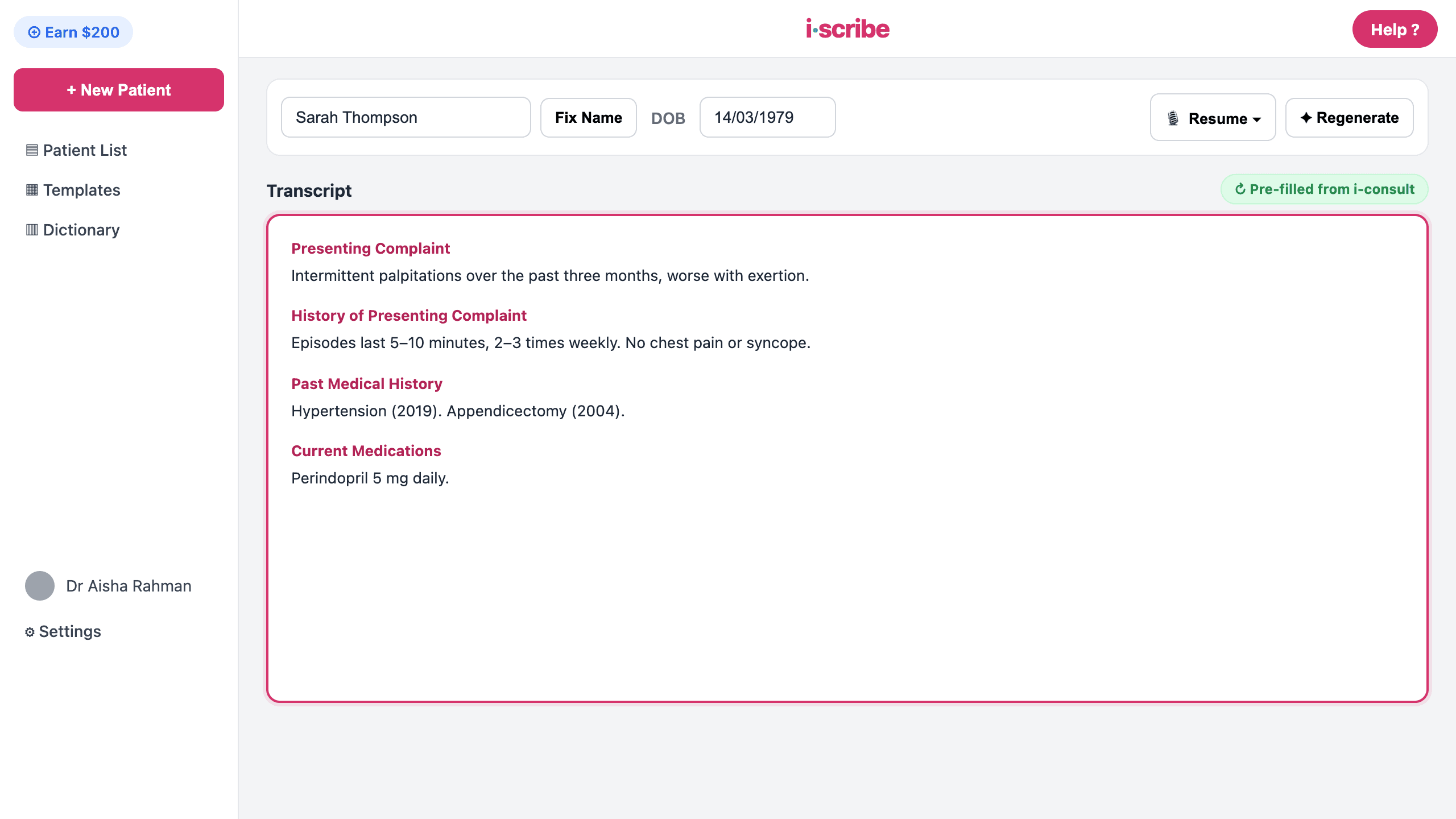
The history appears in your i-scribe transcript box. When you open i-scribe for that patient, the structured history is already populated in the transcript box, ready to review, confirm, and build on during the consult.
What you'll see
When you open i-scribe for a patient who has completed their questionnaire, their structured history is already in the transcript box, the same box you'd normally dictate or type into. You read it, confirm it, and carry on with the consult as you always do. Nothing to download, no second login, no copy-paste.
If a patient hasn't completed (or hasn't started) their questionnaire, you simply won't see a history for them, so run the consult as you normally would. i-consult never blocks your workflow.
Why the history can appear before you've even seen the patient
This is the part that surprises people, so it's worth saying plainly: the history is collected before the appointment, not during it. Your patient fills in their questionnaire in the days leading up to the visit, so the finished history can be waiting in i-scribe well before they walk through your door, sometimes days early.
That's by design. The whole point is to move history-taking to before the consult, so your time in the room is spent on reasoning and decisions instead of data gathering. Seeing a completed history early doesn't mean anything has gone wrong. It means your patient got organised ahead of time.
The history is your patient's own self-reported account, collected before you met them. It's a preparation aid, not a substitute for your own history-taking. You remain responsible for reviewing, confirming, and correcting it during the consultation before relying on it for any clinical decision.
If it doesn't work
- The history isn't showing in i-scribe → see The history isn't showing in i-scribe. The usual causes are the episode not being marked Completed yet, or an EMR integration issue.
- You want the history saved into your EMR as well → that's a separate, optional step. See Send the history to your EMR (Gentu & Genie).
- You'd rather create an episode by hand (for example, an appointment that didn't sync) → see Create a patient episode manually.
Was this guide helpful?