My formatting doesn't work when pasting from i-scribe?
**Why can formatting cause issues?
**
- Each EMR (and other software) can handle text formatting differently. This can cause a variety of formatting issues.
- To combat these formatting issues; in i-scribe, when you click "Copy", the i-scribe output (e.g. the Medical Note or Letter) is converted into a plain text file.
- This means that formatting, such asbolding oritalics is removed.
- This solution creates the least number of issue for our users. We are working on other fixes but these can take time because each software can be different.
A common solution to fix some formatting issues:
- If you are seeing formatting issues, it could be the preset formatting in your EMR (or letterhead template).
- As a test: open a blank, brand-new, word document (not one with letterhead or other preset formatting)
- Click the "Copy" button is i-scribe
- #1: Paste into that word document
- #2: Paste into your EMR (or letterhead)
- If you see no formatting issues in #1, but, you do see formatting issues #2. Then it's likely the preset template settings in the EMR (or letterhead).
- These type of issues include:
- My text always comes out a certain size?
- My text is all bolded?
- My text is all underlined?
- Adjust the preset settings: Each software is different. However, in the example below, you can see an EMR interface and how you can adjust the default formatting settings in that software.
- In this EMR you can adjust the preset settings by:
- Clicking "Settings"
- Clicking "Letter Templates"
- Select the three dots to the right of the Letter Template in question, click "Edit"
- Then you can change the default settings like font size, bolding, etc.
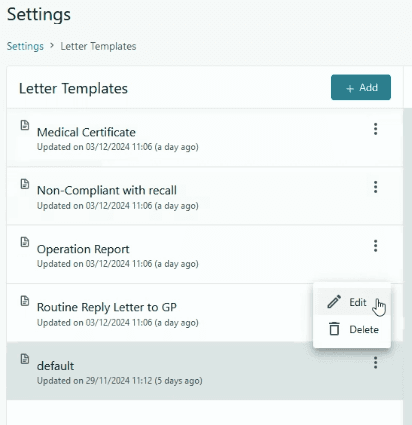
- Your EMR may have different settings. However, that is the general idea about adjusting the preset template settings in an EMR (or in your letterhead) can improve formatting issues.
Was this guide helpful?